



2026.11.25 update
For companies running SQL Server, a server replacement is also an opportunity to rethink how they will operate going forward. As upward pressure on server memory and enterprise SSD prices continues, it has become necessary to reassess how much it would cost to bring in new hardware and maintain the existing environment. In particular, if you are using SQL Server 2016, extended support ended in July 2026, so in addition to hardware replacement costs, you also need to consider the cost of Extended Security Updates (ESU) or an upgrade to a supported version.
So if you move SQL Server to Azure, how much will it cost, and how will the way you operate change?
To maintain your existing environment, you need to purchase new servers and storage devices, and afterward you continue to incur maintenance and backup costs, operations staff costs, and more. If you move to Azure, you initially pay for data migration and testing, and after that, costs are based on the monthly fees for Azure services such as servers and storage.
However, if you move to SQL Server on Azure Virtual Machines and continue using SQL Server 2016 as is, then, just as on-premises, you will incur additional paid ESU costs for security updates. On the other hand, if you switch to a managed DB such as Azure SQL Database · Azure SQL Managed Instance, the latest version is always provided through service updates, so you can operate without any separate ESU costs.
How you operate depends on what you choose to manage yourself in Azure. Azure VMs make it easy to carry over your existing SQL Server environment, and your operations team manages updates and backup policies directly. In contrast, with a managed DB such as Azure SQL Managed Instance, Microsoft handles security updates and automated backups for the service, and your operations team defines and manages the access permissions needed for business, backup retention periods, and recovery criteria.
Now that you’ve looked at the differences in cost items and operating models, it’s time to apply them to your own company’s environment. Use the questions below to organize what you should check before migrating.
| Category | Replace Servers and Continue Operating | Migrate to Azure |
| Upfront costs | Purchase of new servers and storage | Data migration and testing, plus business system modifications if needed |
| Monthly costs | Maintenance, backup, power and space | Azure service fees for servers, storage, etc. |
| Licensing | SQL Server licenses | Included in service fees, or use of eligible existing licenses |
4. Acceptable Downtime and Rollback Plan to the Existing Environment
5. SQL Server Versions and Licensing Status
Use what you’ve checked to take the next step
| If this is your situation | Next step |
|---|---|
| If it looks like the required features and integrations can be implemented, and the estimated cost falls within budget | Proceed with a pilot migration to an Azure managed DB. Start migrating from the scope with the lowest business impact, testing interdependent DBs and scheduled jobs together to verify performance and cutover time. |
| If there are still items to confirm among feature compatibility, performance, estimated cost, cutover and rollback time, and failure recoverability | Start by confirming the conditions that affect the migration decision. Prioritize items with high business impact, such as whether key batch jobs run properly and whether business can resume within the acceptable time. |
| If the required features are difficult to implement in a managed service, or you need direct control over the operating system | Also compare migrating to Azure VMs or staying on-premises. Based on the requirements of each business function, review which scope to move to a managed DB and which to keep in the existing environment. |
If the checks above have helped you confirm your migration direction and preparation items, also check out promotions that can reduce your expected operating costs.
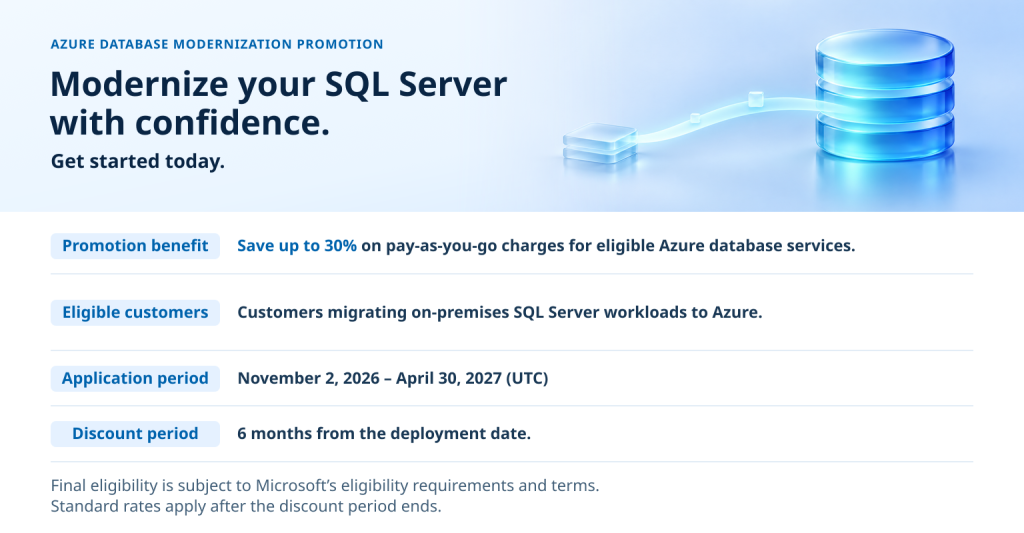
Customers migrating on-premises SQL Server to Azure who meet Microsoft’s eligibility criteria can receive up to a 30% discount on pay-as-you-go fees for eligible Azure database services through Cloocus, a Microsoft CSP partner.
If you have questions about migrating to Azure or the promotion’s eligibility conditions, feel free to contact Cloocus.
Cloocus Corp.
[United States] 500 7th Ave. Fl 8 New York, NY 10018 | Tel.+1 408.7722024 | E-mail.info_us@cloocus.com
[Malaysia] A-3A, Block A, Level 3A, Sunway PJ51A, Jalan SS9A/19, Seri Setia, 47300 Petaling Jaya. | Tel.+6016 331 5396 | E-mail.infoMY@cloocus.com
[Korea Headquarter] 6, Nonhyeon-ro 75-gil, Gangnam-gu, Seoul, Republic of Korea 06247 | Tel.02-597-3400 | E-mail.marketing@cloocus.com
[Korea Busan Campus] 55, Centum jungang-ro, Haeundae-gu, Busan, Republic of Korea | Tel.051-900-3400
[Japan] ARK Hills Front Tower, 2-23-1 Akasaka, Minato-ku, Tokyo | Tel.+81 3.5575.7808 | E-mail.infoJP@cloocus.com
Copyrights 2024 Cloocus co.,ltd. all rights reserved.

