

How Far Can You Go with Copilot? Expanding AI-Powered Work with Cowork
2026.10.06 Update
When Should You Use Copilot Chat vs. Cowork?
- Drafting emails and documents
- Summarizing meetings
- Comparing key information across multiple documents
- Brainstorming ideas and generating suggestions
- Tasks that require working across two or more applications
- Workflows that continue from document creation to email, scheduling, or Teams actions
- Repetitive, manual-intensive tasks involving multiple steps
The right tool therefore depends on the scope and objective of the work.
How Cowork Gets Work Done
❶ Plan Plan and Execute Complex Work with Agentic Workflows
At the core of Cowork is its ability to execute complex, multi-step tasks through agentic workflows.
For example, if a user asks:
“Review Company A’s latest situation and prepare me for the meeting.”
Cowork can break the request down into a sequence of tasks:
Research Company A → Review relevant emails and meeting information → Analyse key issues → Create a meeting briefing
Cowork executes these steps and delivers an output for the user to review.
Rather than requiring the user to provide instructions for every individual step, Cowork can proactively move the work forward based on the overall goal.
[Integrated Plugin]
| Integration | Key Use Cases |
| Dynamics 365 Sales | Access leads, opportunities, customer accounts, and sales pipeline information |
| Dynamics 365 Customer Service | Manage customer enquiries, service cases, and support workflows |
| Dynamics 365 ERP | Work with finance, supply chain, and operational processes |
| Fabric IQ | Access and analyse Microsoft Fabric and Power BI data and generate reports |
❹ Automate&Control Maintain Human Control within Automated Workflows
Cowork supports scheduled prompts and event-driven tasks, enabling work to run at a specified time or start in response to events such as receiving an email or Teams message.
However, automation does not mean handing over complete control to AI.
Cowork incorporates a Human-in-the-Loop approach. Before performing consequential actions—such as sending an email or posting a Teams message—it can request user approval.
Cowork can also indicate the risk level associated with a task, allowing users to review an action before it is executed. Users can approve or stop an action or provide additional instructions when necessary.
In other words, even as AI becomes continuously involved in executing work, Cowork is designed so that users retain final judgement and control over important actions.
*Human-in-the-Loop (HITL): A collaborative approach in which humans actively participate in an AI system’s decision-making or task execution process to provide judgement, validate results, and make corrections when necessary.
How Can Cowork Transform the Way Your Organization Works?
Cowork can be applied across a wide range of business scenarios. Let’s look at two common enterprise workflows to see how Cowork can change the way work gets done.
As-Is
-
Preparing for a customer meeting often requires employees to search across multiple business tools, such as Outlook and SharePoint, to find and consolidate customer communications and relevant materials.
They then need to create a meeting briefing based on the information they have gathered. After the meeting, additional work follows, including writing meeting minutes and sharing them internally.
As a result, completing a single workflow often requires users to repeatedly switch between multiple business applications.
With Cowork
-
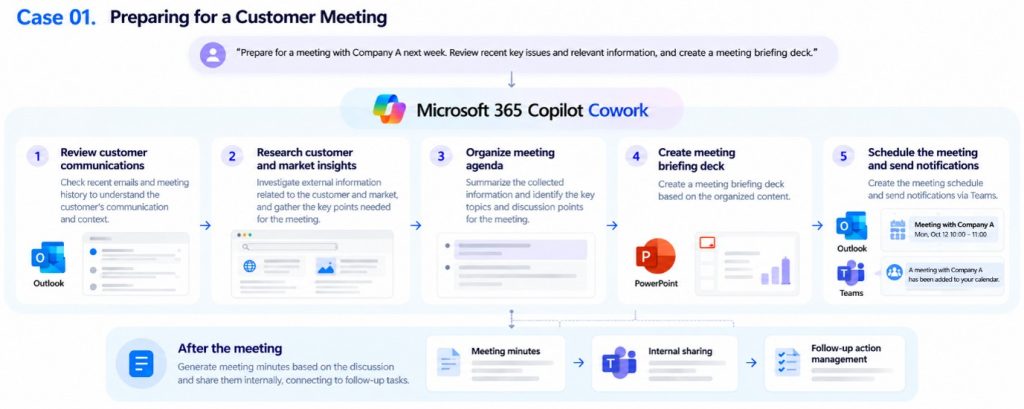
“Prepare for a meeting with Company A next week. Review recent key issues and relevant information, and create a meeting briefing deck.”
With a request like this, Cowork can move across the required tools—including Outlook, PowerPoint, and Teams—to find and consolidate relevant information and carry out the steps required to prepare for the meeting.
Cowork can then continue into post-meeting tasks, connecting preparation and follow-up work as part of the same workflow.
To-Be
-
Focus on higher-value decision-making
By reducing the time spent switching between business tools and manually consolidating information, employees can spend more time reviewing key customer issues, evaluating priorities, and developing the right response strategy. -
Reduce the risk of missed follow-up actions
By connecting post-meeting tasks such as meeting minutes and internal sharing within the same workflow, organisations can reduce the risk of follow-up actions being overlooked during manual hand-offs.
Case ❷. Automating Weekly Work Reports
As-Is
-
Preparing a weekly report typically requires employees to manually review a week’s worth of activity across messaging tools, emails, and other sources, and then consolidate the relevant information.
They must then compare the latest information with the previous week’s report, identify key changes and issues, and prepare the report in the required format.
The same process has to be repeated every week.
With Cowork
-
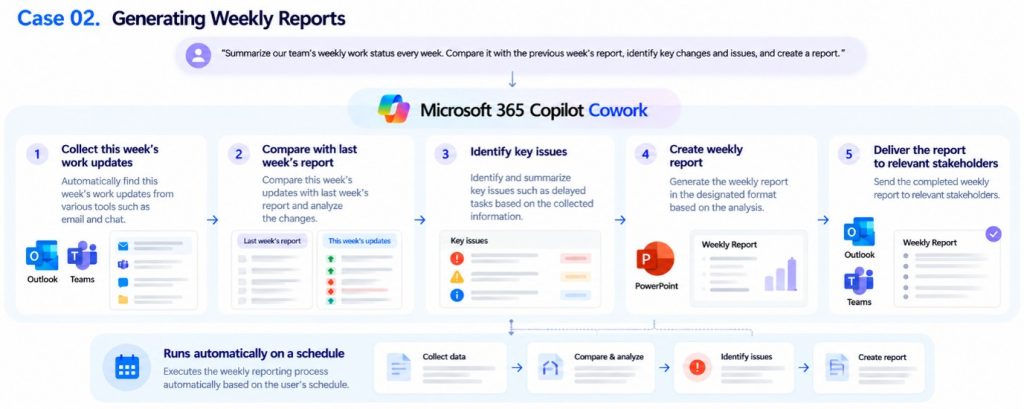
“Summarise our team’s weekly work status every week. Compare it with the previous week’s report, identify key changes and issues, and create a report.”
With Cowork, the workflow can run according to a schedule set by the user.
Each week, Cowork can review and consolidate work updates, compare them with the previous report, identify major changes and issues, and generate the weekly report.
To-Be
-
Reduce the burden of repetitive reporting
Cowork can carry out recurring reporting tasks according to a predefined schedule, reducing manual effort while helping teams maintain a consistent reporting process. -
Focus on key issues and priorities
With key changes and issues already consolidated into the report, employees can focus on reviewing the current situation, identifying what requires attention, and determining priorities for the work ahead.
Closing
Until now, AI has largely been used as an assistant for individual tasks such as summarizing information, drafting content, and organizing information.
Cowork expands that role. When a user defines a goal, Cowork can connect multiple tasks and carry out work from the initial request through to the final output—demonstrating how Microsoft AI is expanding from task-level assistance into actual work execution across enterprise environments.
If you would like to explore how Cowork can be introduced and applied within your organization, feel free to contact Cloocus.
Cloocus consultants can help identify the right Copilot use cases based on your organization’s business environment, workflows, and objectives.
Key Q&A
-
Q1. How is Copilot Cowork different from the existing Copilot experience?
While existing Copilot experiences primarily act as assistants that respond quickly to user requests, Cowork is closer to an autonomous agentic system that can understand work context, determine the next steps, and execute them as part of a connected workflow. -
Q2. How does Cowork address security concerns?
Cowork follows Microsoft’s existing security and privacy standards. When accessing internal data such as emails and documents, Cowork operates only within the permissions granted to the user. -
Q3. What types of work are best suited to Cowork?
Cowork is particularly useful for work that spans multiple steps or systems, such as project coordination across teams, workflows that move from data analysis to report creation, and repetitive tasks involving information collection and organization. -
Q4. What is required to use Cowork?
Cowork is designed for enterprise use. Users need an eligible Microsoft 365 Copilot license, while administrators need to enable usage-based billing and configure access to Cowork through the Microsoft 365 admin environment.
Once enabled, Cowork can be accessed through supported Microsoft Copilot experiences across web, desktop, and mobile. -
Q5. How is Cowork usage billed?
Cowork uses a consumption-based billing model built around Copilot Credits, reflecting the continuous computing involved in agentic work. Usage can include model responses, tool and skill calls, image generation, and other actions performed during a Cowork task. Administrators can also manage usage and spending limits for users or groups.
Related Posts
How Far Can You Go with Copilot? Expanding AI-Powered Work with Cowork
2026.10.06 업데이트
When Should You Use Copilot Chat vs. Cowork?
- Drafting emails and documents
- Summarizing meetings
- Comparing key information across multiple documents
- Brainstorming ideas and generating suggestions
- Tasks that require working across two or more applications
- Workflows that continue from document creation to email, scheduling, or Teams actions
- Repetitive, manual-intensive tasks involving multiple steps
The right tool therefore depends on the scope and objective of the work.
How Cowork Gets Work Done
❶ Plan Plan and Execute Complex Work with Agentic Workflows
At the core of Cowork is its ability to execute complex, multi-step tasks through agentic workflows.
For example, if a user asks:
“Review Company A’s latest situation and prepare me for the meeting.”
Cowork can break the request down into a sequence of tasks:
Research Company A → Review relevant emails and meeting information → Analyse key issues → Create a meeting briefing
Cowork executes these steps and delivers an output for the user to review.
Rather than requiring the user to provide instructions for every individual step, Cowork can proactively move the work forward based on the overall goal.
[Integrated Plugin]
| Integration | Key Use Cases |
| Dynamics 365 Sales | Access leads, opportunities, customer accounts, and sales pipeline information |
| Dynamics 365 Customer Service | Manage customer enquiries, service cases, and support workflows |
| Dynamics 365 ERP | Work with finance, supply chain, and operational processes |
| Fabric IQ | Access and analyse Microsoft Fabric and Power BI data and generate reports |
❹ Automate&Control Maintain Human Control within Automated Workflows
Cowork supports scheduled prompts and event-driven tasks, enabling work to run at a specified time or start in response to events such as receiving an email or Teams message.
However, automation does not mean handing over complete control to AI.
Cowork incorporates a Human-in-the-Loop approach. Before performing consequential actions—such as sending an email or posting a Teams message—it can request user approval.
Cowork can also indicate the risk level associated with a task, allowing users to review an action before it is executed. Users can approve or stop an action or provide additional instructions when necessary.
In other words, even as AI becomes continuously involved in executing work, Cowork is designed so that users retain final judgement and control over important actions.
*Human-in-the-Loop (HITL): A collaborative approach in which humans actively participate in an AI system’s decision-making or task execution process to provide judgement, validate results, and make corrections when necessary.
How Can Cowork Transform the Way Your Organization Works?
Cowork can be applied across a wide range of business scenarios. Let’s look at two common enterprise workflows to see how Cowork can change the way work gets done.
As-Is
-
Preparing for a customer meeting often requires employees to search across multiple business tools, such as Outlook and SharePoint, to find and consolidate customer communications and relevant materials.
They then need to create a meeting briefing based on the information they have gathered. After the meeting, additional work follows, including writing meeting minutes and sharing them internally.
As a result, completing a single workflow often requires users to repeatedly switch between multiple business applications.
With Cowork
-
“Prepare for a meeting with Company A next week. Review recent key issues and relevant information, and create a meeting briefing deck.”
With a request like this, Cowork can move across the required tools—including Outlook, PowerPoint, and Teams—to find and consolidate relevant information and carry out the steps required to prepare for the meeting.
Cowork can then continue into post-meeting tasks, connecting preparation and follow-up work as part of the same workflow.
To-Be
-
Focus on higher-value decision-making
By reducing the time spent switching between business tools and manually consolidating information, employees can spend more time reviewing key customer issues, evaluating priorities, and developing the right response strategy. -
Reduce the risk of missed follow-up actions
By connecting post-meeting tasks such as meeting minutes and internal sharing within the same workflow, organisations can reduce the risk of follow-up actions being overlooked during manual hand-offs.
Case ❷. Automating Weekly Work Reports
As-Is
-
Preparing a weekly report typically requires employees to manually review a week’s worth of activity across messaging tools, emails, and other sources, and then consolidate the relevant information.
They must then compare the latest information with the previous week’s report, identify key changes and issues, and prepare the report in the required format.
The same process has to be repeated every week.
With Cowork
-
“Summarise our team’s weekly work status every week. Compare it with the previous week’s report, identify key changes and issues, and create a report.”
With Cowork, the workflow can run according to a schedule set by the user.
Each week, Cowork can review and consolidate work updates, compare them with the previous report, identify major changes and issues, and generate the weekly report.
To-Be
-
Reduce the burden of repetitive reporting
Cowork can carry out recurring reporting tasks according to a predefined schedule, reducing manual effort while helping teams maintain a consistent reporting process. -
Focus on key issues and priorities
With key changes and issues already consolidated into the report, employees can focus on reviewing the current situation, identifying what requires attention, and determining priorities for the work ahead.
Closing
Until now, AI has largely been used as an assistant for individual tasks such as summarizing information, drafting content, and organizing information.
Cowork expands that role. When a user defines a goal, Cowork can connect multiple tasks and carry out work from the initial request through to the final output—demonstrating how Microsoft AI is expanding from task-level assistance into actual work execution across enterprise environments.
If you would like to explore how Cowork can be introduced and applied within your organization, feel free to contact Cloocus.
Cloocus consultants can help identify the right Copilot use cases based on your organization’s business environment, workflows, and objectives.
Key Q&A
-
Q1. How is Copilot Cowork different from the existing Copilot experience?
While existing Copilot experiences primarily act as assistants that respond quickly to user requests, Cowork is closer to an autonomous agentic system that can understand work context, determine the next steps, and execute them as part of a connected workflow. -
Q2. How does Cowork address security concerns?
Cowork follows Microsoft’s existing security and privacy standards. When accessing internal data such as emails and documents, Cowork operates only within the permissions granted to the user. -
Q3. What types of work are best suited to Cowork?
Cowork is particularly useful for work that spans multiple steps or systems, such as project coordination across teams, workflows that move from data analysis to report creation, and repetitive tasks involving information collection and organization. -
Q4. What is required to use Cowork?
Cowork is designed for enterprise use. Users need an eligible Microsoft 365 Copilot license, while administrators need to enable usage-based billing and configure access to Cowork through the Microsoft 365 admin environment.
Once enabled, Cowork can be accessed through supported Microsoft Copilot experiences across web, desktop, and mobile. -
Q5. How is Cowork usage billed?
Cowork uses a consumption-based billing model built around Copilot Credits, reflecting the continuous computing involved in agentic work. Usage can include model responses, tool and skill calls, image generation, and other actions performed during a Cowork task. Administrators can also manage usage and spending limits for users or groups.
Related Posts

Cloocus Corp.
[United States] 500 7th Ave. Fl 8 New York, NY 10018 | Tel.+1 408.7722024 | E-mail.info_us@cloocus.com
[Malaysia] A-3A, Block A, Level 3A, Sunway PJ51A, Jalan SS9A/19, Seri Setia, 47300 Petaling Jaya. | Tel.+6016 331 5396 | E-mail.infoMY@cloocus.com
[Korea Headquarter] 6, Nonhyeon-ro 75-gil, Gangnam-gu, Seoul, Republic of Korea 06247 | Tel.02-597-3400 | E-mail.marketing@cloocus.com
[Korea Busan Campus] 55, Centum jungang-ro, Haeundae-gu, Busan, Republic of Korea | Tel.051-900-3400
[Japan] ARK Hills Front Tower, 2-23-1 Akasaka, Minato-ku, Tokyo | Tel.+81 3.5575.7808 | E-mail.infoJP@cloocus.com
Copyrights 2024 Cloocus co.,ltd. all rights reserved.