

The Vibe-Coding Era Why Enterprises Are Turning to GitHub Copilot
2026.10.20 update
In its April 2026 earnings announcement, Microsoft reported that approximately 140,000 organisations were using GitHub Copilot, with enterprise subscribers growing to roughly three times the previous year’s level.
As vibe coding—developing software by describing requirements in natural language—gains attention and a growing range of AI coding tools enters the market, why are enterprises adopting GitHub Copilot?
Enterprise development requires more than the ability to generate code quickly. Teams must also account for their development standards, internal systems and established workflows. As AI adoption expands across the organisation, administrators face additional challenges in areas such as cost and security.
This is where GitHub Copilot stands out. For developers, it acts as a colleague that understands the team’s context. For administrators, it provides a way to control the AI environment in line with organizational policies.
GitHub Copilot for Developers: From Writing Code to Making Decisions
Enterprise development productivity is determined by more than coding speed. Implementing a new feature requires understanding the existing code and system architecture, making changes across multiple files, verifying the impact on the service and, ultimately, deploying the result.
Suppose a developer is assigned the task of adding membership-tier discount conditions to a checkout page. How can GitHub Copilot improve productivity throughout this process?
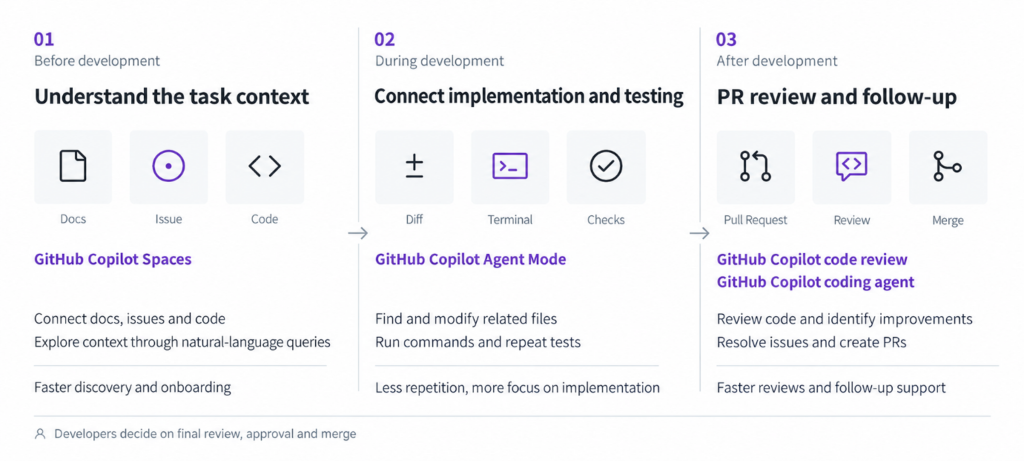
❶ Before Development: Understanding the Task Context
For a developer assigned a new task in an enterprise environment, the first step is understanding the context. Adding membership-tier discount logic to an existing service requires a comprehensive understanding of the discount calculation logic, payment APIs and policy documents. When this information is scattered across code, documents and past issues, finding it can take considerable time.
GitHub Copilot shortens this discovery process through natural-language questions and answers. By connecting planning documents, issues and code in GitHub Copilot Spaces, a dedicated team knowledge repository, developers can explore the background by asking AI questions as they would ask a colleague.
With less time spent locating individual resources, developers can move more quickly into implementation work such as designing the solution’s structure. New team members can also use GitHub Copilot to build their understanding independently, shortening onboarding. Connected team coding guidelines help them begin development in line with consistent standards.
❷ During Development: Connecting Changes Across Files and Testing in One Workflow
Once the context is clear, implementation often requires modifying several related files to update a single feature. Repeated testing is also needed to check that the changes do not adversely affect the existing system.
GitHub Copilot’s Agent Mode can bring this iterative validation loop into a single workflow. When a developer provides requirements, GitHub Copilot explores the relevant files, makes changes across them and runs the necessary terminal commands to carry out tests.
This reduces time spent switching between files, typing routine code and repeatedly building the application. Developers can focus more on work that requires their judgement, such as handling exceptional conditions and assessing architectural stability.
❸ After Development: Pull Requests and Code Review
Once implementation is complete, developers create a pull request (PR) to share their changes, which are reviewed before being incorporated. Code review may also identify follow-up tasks, such as expanding test coverage for specific scenarios or fixing bugs.
GitHub Copilot supports the connected process of PR creation, follow-up work and final approval. Developers can request a review of changed code by selecting Copilot from the Reviewers list on the PR page. Follow-up work can be assigned to GitHub Copilot through a GitHub issue; it can then complete the task and create a PR with the changes. Developers review the results in the PR and decide whether further changes or a final merge are appropriate.
Teams can delegate suitable tasks, such as clearly scoped changes, to AI while retaining a process in which people make the final decision and approve changes under internal access controls and review standards. This helps maintain both productivity and stability.
GitHub Copilot for Administrators
As GitHub Copilot adoption expands from individual developers to teams and across the organisation, administrators face a new challenge: operational governance. Four key questions typically arise.
- How can we understand AI usage across the organisation and keep it within budget?
- How should access rights and licences be adjusted when employees join, leave or move between teams?
- Can we restrict the available AI models to those that meet the team’s work requirements and security standards?
- How are internal code and data sent to AI processed, and how can their security be managed?
GitHub Copilot’s distinctive strength in enterprise environments extends beyond development productivity: it provides management capabilities that address each of these questions.
❶ Managing AI Usage and Costs
Administrators need to understand how AI is actually being used while preventing unexpected charges within a defined budget. However, usage frequency, features and model preferences vary by user, making licence counts alone insufficient to assess adoption and costs.
Within GitHub Copilot, administrators can review both usage and spending patterns. The usage metrics dashboard shows active user counts and usage trends by feature and model, while billing management shows AI Credits consumption by user, model and organisation. These insights help identify areas that may need training and support because of low adoption, or adjustments to budgets and usage policies because of high consumption.
This approach to cost management is linked to GitHub Copilot’s pooled credit structure. The Business and Enterprise plans include 1,900 and 3,900 AI Credits per user per month, respectively, which are shared in an organisation-wide pool. For example, a company with 100 Enterprise licences shares 390,000 credits per month, allowing flexible allocation according to employees’ usage patterns within configured limits. Routine coding assistance, such as code completion and next edit suggestions, does not consume AI Credits and is available without limits under paid plans.
Administrators also need to configure in advance what happens once the pooled credits are exhausted. Additional paid usage is enabled by default, so usage beyond the included credits is billed separately. To prevent unexpected additional charges, administrators must disable this option in AI Controls.
Administrators can then set consumption limits per user and budgets for additional usage, using alerts to monitor consumption and control unexpected spending. This enables enterprises to track actual demand and operate within a defined budget.
| Category | Copilot Business | Copilot Enterprise |
| Monthly price per user | $19 | $39 |
| AI Credits included per user per month | 1,900 | 3,900 |
| Requirements | Available with a GitHub organisation or enterprise account | Requires GitHub Enterprise Cloud |
[Reference : GitHub Copilot Plan]
❷ Managing License Assignment and Revocation Across the Organisation
When employees join, leave or transfer between departments, administrators must adjust their AI access accordingly. Managing this manually can result in delayed access or missed changes.
In an Enterprise Managed Users environment, GitHub Copilot supports extending existing identity management processes to Copilot through an external identity provider (IdP).
For example, a company that manages employee accounts through Microsoft Entra ID can synchronise a group of intended Copilot Business users with a GitHub enterprise team and assign licences to that team. Access to GitHub Copilot can then be managed by adding employees to or removing them from the group. When an employee leaves, deactivating the account is automatically reflected in GitHub, blocking access to GitHub Copilot.
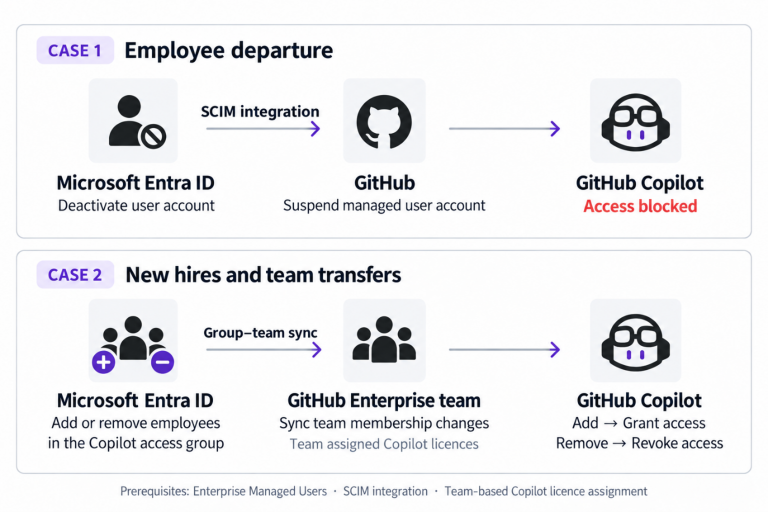
Enterprises can therefore extend their existing account management framework to GitHub Copilot access. Administrators spend less time changing permissions for individual employees and can use a consistent process to grant and revoke access as staffing change
❸ Defining Which Models and Agents Can Be Used
Developers may prefer different AI models, but enterprises cannot always allow unrestricted access to every model. They need to assess each model’s data processing terms and usage costs, then approve models that meet internal security standards and business needs. Administrators must preserve developer choice while ensuring that AI use stays within the approved scope.
GitHub Copilot’s AI Controls allow administrators to specify whether each model is permitted. They can apply a common policy across the enterprise or allow individual organisations to decide whether particular models are enabled. Developers can then switch freely between models within the permitted scope.
- Enterprise-wide: Allow only models that have passed security review.
- General development teams: Primarily use standard models sufficient for everyday development.
- Platform and architecture teams: Also allow high-performance models for complex design work.
This approach allows enterprises to enforce common restrictions where needed while adjusting model access by organisation. By making high-performance models available only to the teams that need them, companies can use the same budget more efficiently while meeting security requirements.
❹ Standards for Processing and Protecting Enterprise Data
Source code is a critical enterprise asset containing core technology and business logic. Administrators therefore need to understand how code and business information sent to AI are processed and whether sensitive data is used to train models.
GitHub states that the data processing terms for its Copilot Business and Enterprise plans do not allow customer data to be used to train AI models. This condition applies automatically to these plans rather than being a feature that administrators must enable separately, helping reduce concerns about internal code and business information being used for model training.
Enterprises can use this as a basis for adoption policies while reviewing the data transmission and processing terms required to deliver the service against internal security standards. Defining which code and information may be entered into GitHub Copilot helps establish internal guidelines for AI use.
A Practical Guide to GitHub Copilot: From Developer Use to Administrative Management
Among GitHub Copilot’s many applications, the following representative use cases can help enterprises see the benefits of adoption quickly. Each example outlines how developers can use the tool, alongside the settings and management considerations administrators should prepare to support them.
❶ Analyzing and Modernizing Legacy Code Understanding and improving systems with limited documentation or a change in ownership.
- How to use it: Connect the target repository and existing design documents to Spaces, then use questions to understand the structure and logic → Use Agent Mode for incremental refactoring and testing.
- Management considerations: Limit the scope to code and documents approved for AI use. Check in advance that sensitive configuration values and credentials are excluded from the working environment and input materials, and apply refactoring changes only after testing and code review.
❷ Delegating Clearly Scoped, Repetitive Improvements Tasks that accumulate as priorities shift, such as expanding test coverage, updating libraries and fixing minor bugs.
- How to use it: Assign an issue to Copilot cloud agent → GitHub Copilot completes the work and creates a PR → A developer reviews and merges the changes.
- Management considerations: Select which organisations are allowed to use cloud agent, and set budgets at both user and organisation level as agent activity grows.
*Cloud agent and Copilot code review consume GitHub Actions minutes as well as AI Credits. Manage credit consumption alongside included Actions minutes and any overage charges.
❸ Onboarding New Team Members and Establishing Development Standards Helping people joining a project learn internal standards and system context.
- How to use it: Bring coding rules, architecture documents and key repositories together in an organisation-shared Space → New team members explore the context through questions and answers.
- Management considerations: Specify internal coding standards in the shared Space’s instructions, including response guidelines and relevant policies, so they are consistently reflected in GitHub Copilot’s responses.
GitHub Copilot offers significant value in enterprise environments where development productivity and organisation-wide operational management are both essential. For companies that already develop and collaborate on GitHub, using AI within established workflows makes adoption and broader use easier.
Turning this value into tangible results requires embedding AI into the organisation’s work beyond simply purchasing licences. To support this, costs, access rights and usage policies need to be designed and managed together from the outset.
As an official Microsoft partner, Cloocus helps consolidate GitHub Copilot license fees and additional AI Credits charges into Azure subscription billing, allowing companies to manage them alongside existing costs. From Microsoft Entra ID-based license management tailored to your account environment to budget and usage policy configuration, work with Cloocus to establish a stable foundation for operating GitHub Copilot within the Microsoft ecosystem.
References
- Microsoft, Microsoft Fiscal Year 2026 Third Quarter Earnings Conference Call
- GitHub Docs, Creating GitHub Copilot Spaces
- GitHub Docs, GitHub Copilot code review
- GitHub Docs, GitHub Copilot seats and billing cycles for organizations and enterprises
- GitHub Docs, Usage-based billing for organizations and enterprises
- GitHub Docs, Granting users access to GitHub Copilot in your enterprise
- GitHub Docs, Supported surfaces for GitHub Copilot policies
- GitHub Docs, Content exclusion for GitHub Copilot
- GitHub Docs, Piloting GitHub Copilot cloud agent in your organization
- GitHub Docs, GitHub Actions billing
- GitHub Docs, GitHub Copilot billing through Azure
Sources accessed: 19 October 2026
Related Posts

Cloocus Corp.
[United States] 500 7th Ave. Fl 8 New York, NY 10018 | Tel.+1 408.7722024 | E-mail.info_us@cloocus.com
[Malaysia] A-3A, Block A, Level 3A, Sunway PJ51A, Jalan SS9A/19, Seri Setia, 47300 Petaling Jaya. | Tel.+6016 331 5396 | E-mail.infoMY@cloocus.com
[Korea Headquarter] 6, Nonhyeon-ro 75-gil, Gangnam-gu, Seoul, Republic of Korea 06247 | Tel.02-597-3400 | E-mail.marketing@cloocus.com
[Korea Busan Campus] 55, Centum jungang-ro, Haeundae-gu, Busan, Republic of Korea | Tel.051-900-3400
[Japan] ARK Hills Front Tower, 2-23-1 Akasaka, Minato-ku, Tokyo | Tel.+81 3.5575.7808 | E-mail.infoJP@cloocus.com
Copyrights 2024 Cloocus co.,ltd. all rights reserved.