

Solutions
[split_line_heading]Microsoft 365
A complete, intelligent and safe solution
[/split_line_heading]It is a complete intelligent solution that includes Office 365, Windows 10 and Enterprise Mobility + Security that will help all employees to be creative and work safely.
Best choice for reinforcing security

Office 365
Best platform for collaboration
Enterprise Mobility + Security
[nectar_icon icon_family=”iconsmind” icon_style=”default” icon_color=”black” icon_padding=”10px” icon_iconsmind=”iconsmind-Structure”]
Azure Active Directory
User and group management
External user management
Access management
Device registration management
[nectar_icon icon_family=”iconsmind” icon_style=”default” icon_color=”black” icon_padding=”10px” icon_iconsmind=”iconsmind-Security-Settings”]
Azure Information Protection
Mobile device management
Mobile application management
Data protection
Integrated PC management
[nectar_icon icon_family=”iconsmind” icon_style=”default” icon_color=”black” icon_padding=”10px” icon_iconsmind=”iconsmind-Monitor-phone”]
Microsoft Intune
Mobile device management
Mobile application management
Data protection
Integrated PC management
[nectar_icon icon_family=”iconsmind” icon_style=”default” icon_color=”black” icon_padding=”10px” icon_iconsmind=”iconsmind-Rook”]
Azure advanced threat Analytics
Cloud app security
Detecting and investigating intelligent attacks and suspicious behavior on the cloud and on-premise
When the working environment is changed to the cloud, it is time to manage the individual devices of employees.
[nectar_icon icon_family=”iconsmind” icon_style=”default” icon_color=”black” icon_padding=”10px” icon_iconsmind=”iconsmind-Monitor-Laptop”]
53% of today’s global manpower use three or more devices and use many applications in several locations.
[nectar_icon icon_family=”iconsmind” icon_style=”default” icon_color=”black” icon_padding=”10px” icon_iconsmind=”iconsmind-Tablet-Phone”]
90% of enterprises have two or more mobile operating systems.
[nectar_icon icon_family=”iconsmind” icon_style=”default” icon_color=”black” icon_padding=”10px” icon_iconsmind=”iconsmind-Hand-TouchSmartphone”]
67% of people using smartphones and 70% of people using tablet PCs select their own devices for work.
[nectar_icon icon_family=”iconsmind” icon_style=”default” icon_color=”black” icon_padding=”10px” icon_iconsmind=”iconsmind-Mail-Outbox”]
56% of users send their first e-mail before arrival at the office, and 73% of them send their last e-mail before leaving the office.
[nectar_icon icon_family=”iconsmind” icon_style=”default” icon_color=”black” icon_padding=”10px” icon_iconsmind=”iconsmind-Smartphone-Secure”]
Data leakage due to the loss and theft of devices is the biggest smartphone security risk factor.
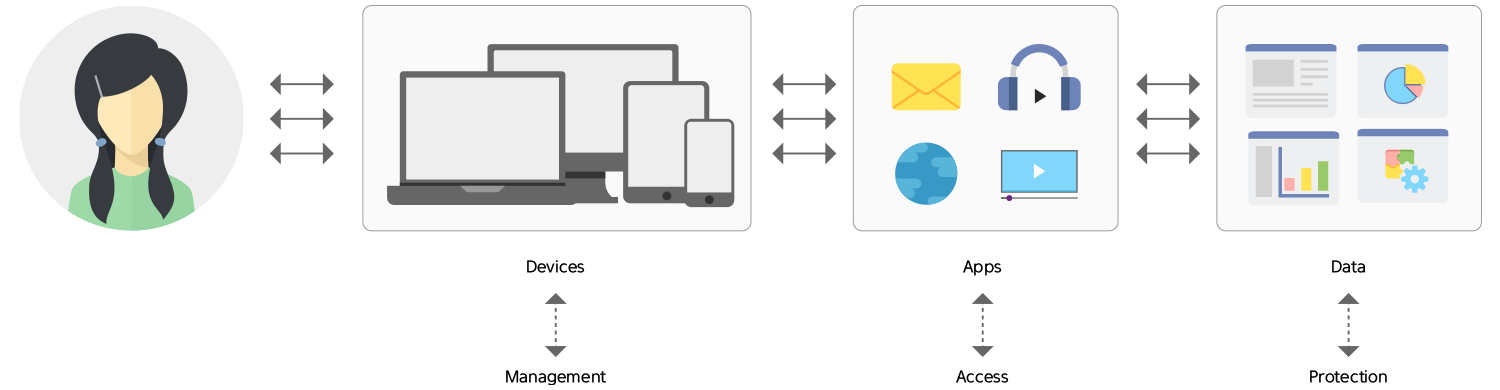
The EMS function of M365 can manage devices, control app access and protect data.
Microsoft 365 introduction process
(1) Customer needs analysis
- Business needs
- IT needs analysis
(2) Establishing the roadmap
- Existing system analysis
- AS-IS analysis
- Establishing To-Be
- Budget calculation – TCO/ROI analysis
(3) Implementation
- Establishing the implementation schedule
- Implementation
(4) Training and operation
- Customers’ direct operation
- Failure response service (separate)